
A clear message can still be misunderstood when it arrives as a wall of text. Video lets leaders put a voice and face to important updates, while showing employees what the message means in practice. Useful internal communications video ideas include leadership updates, onboarding and company change announcements.
Written updates still matter, but they do not always convey tone or make complex information easy to follow. A focused video can bring the message to life and help teams understand what is changing, why it matters and what happens next.
Here are practical formats for leadership messages, welcoming new starters and explaining organisational change, plus guidance on keeping each video clear and purposeful. The aim is to help your message reach employees wherever they work.
Key Takeaways
- Give each video one central message, then choose a format that suits its purpose, from a concise leadership update to a longer Q&A.
- Use employee recognition videos to share contributions and personal stories, helping colleagues feel seen and connected.
- Plan onboarding videos around your organisation’s culture, values and processes so new starters can revisit essential information.
- For change announcements, explain what is changing, why it matters and what employees can expect next.
1. Company-wide announcements and leadership messages
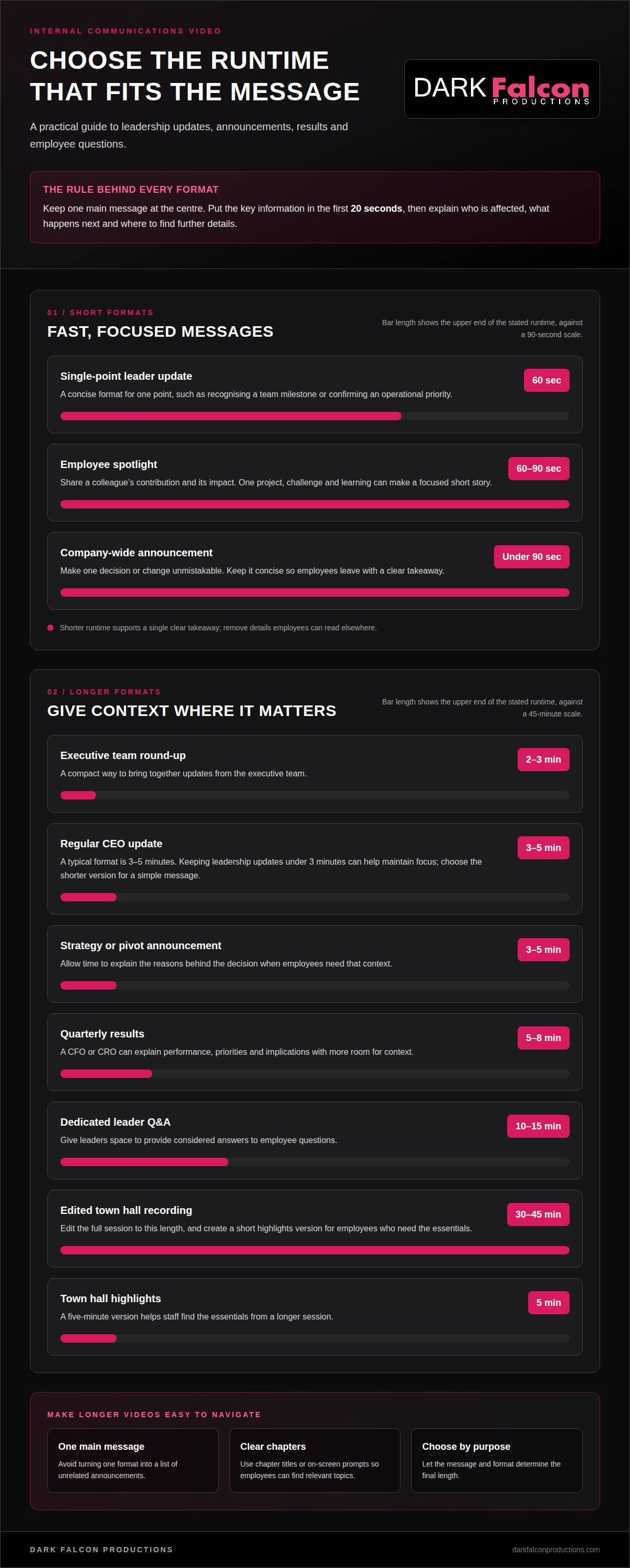
Use company-wide announcements to make one decision or change unmistakable. Put the key information within the first 20 seconds, then explain who is affected, what happens next and where employees can find further details. Keep announcements under 90 seconds when possible. A concise message gives staff a clear takeaway without asking them to absorb several updates at once.
For short leader updates, a 60-second format works well for a single point, such as recognising a team milestone or confirming an operational priority. A visual setting and direct delivery can make the message feel personal. For a regular CEO update, 3-5 minutes is a typical format, although keeping leadership updates under 3 minutes can help maintain focus. Choose the shorter version when the message is simple.
Quarterly results need more context. A CFO or CRO can use 5-8 minutes to explain performance, priorities and implications, while an executive team round-up typically takes 2-3 minutes. A strategy or pivot announcement can also run 3-5 minutes if employees need to understand the reasons behind the decision. Keep each format centred on one main message, rather than turning it into a list of unrelated announcements.
Town halls combine leadership updates with employee questions, but the full recording may be too long for every viewer. Edit the session to 30-45 minutes and create a 5-minute highlights version for staff who need the essentials. A dedicated leader Q&A can run 10-15 minutes, giving space for considered answers. Add clear chapter titles or on-screen prompts so employees can find relevant topics quickly.
How long should an internal communications video be? For a focused announcement, aim for under 90 seconds; broader updates may need 2-5 minutes. Let the message and format determine the final length, and remove detail that employees can read elsewhere.
2. Why use video for internal communications?
A recognition video can make appreciation feel personal. Feature a colleague explaining a contribution, then show its impact on the team. Employee spotlights typically run for 60-90 seconds, giving space for a short story without losing focus. Ask one colleague about a project, a challenge and what they learned.
Stories can also connect people with workplace culture. A video introducing team traditions or showing how a value shapes daily work makes company principles more tangible. The NHS has used video messages and montages to share information and recognise staff commitment. For wellbeing or crisis communication, a calm speaker can explain available support, acknowledge uncertainty and direct employees to relevant internal resources.
Video adds voice, expression and visual context to an internal comms strategy, but it works best with a clear purpose. Gallup reports that 13% of employees worldwide feel truly engaged at work. A video won’t solve engagement on its own; use it to explain a decision, recognise effort or make leadership more visible. Then invite a response so employees can connect with the message.
What accessibility requirements apply to internal videos in the UK? Use accurate captions, a transcript and clear on-screen text. Make sure the essential meaning is available without sound, and never rely on colour alone to convey key information.
What are examples of successful internal communications video campaigns? NHS video messages and staff montages offer a practical example, combining updates with recognition. A similar campaign could highlight staff contributions around a specific organisational milestone.
What equipment and software are needed to make internal company videos? A camera or smartphone, microphone, suitable lighting and editing software can be enough for a straightforward update. Add captions during editing, then review the finished video for clarity.
What are the best practices for filming and distributing workplace videos? Focus on one message, film in a quiet space, frame the speaker clearly and add captions. Share the finished video by email, on internal social media or through the company intranet.
How can businesses measure the effectiveness of internal communications videos? Track watch-through rate and unique viewer rate, then compare viewing patterns across different messages. A considered video production approach can help make each piece of content clear and purposeful.
3. Onboarding videos
A welcome video from a senior leader can give new starters a direct introduction to the organisation’s values and priorities. Keep it concise, with a personal welcome, a clear explanation of the organisation’s purpose and one practical next step. A named speaker helps new employees put a face to the company before their first team meeting.
Build a short onboarding series around the first 30 days, rather than packing every process into one film. Each module can cover a single task, such as accessing workplace systems, understanding team responsibilities or finding support. Modules typically run 2-5 minutes, giving starters time to absorb information and return to the relevant topic during learning.
Benefits and leave videos can explain where employees can find the organisation’s policies and who can answer questions. Make the content accessible with captions, a transcript and clear links to relevant internal documents. Use a simple scenario, such as a new colleague preparing for planned leave, to show where to find guidance without trying to cover every individual circumstance.
Peer-to-peer videos add practical detail to onboarding. Invite a colleague to demonstrate a common task, introduce team routines or explain how people collaborate across departments. New starters may find a familiar process easier to follow when they see a colleague work through it step by step. Keep each film focused on one task, using on-screen labels to highlight key actions.
Structured onboarding can support retention and engagement. Brandon Hall Group reports that organisations with structured onboarding are up to 103% more likely to improve new-hire retention and engagement. It also reports that organisations using technology-enabled onboarding are 33% more likely to improve time to proficiency. Use those findings to shape a measured programme: introduce culture first, then release role-specific learning as new starters need it.
For a coherent experience, give every video a consistent title, visual style and closing prompt. A new starter should know whether to watch the next video, practise a task or speak with a colleague. Review the series as processes change so examples and guidance remain useful to each incoming group.
4. Change, restructure and merger announcements
A change announcement should explain what is changing, why it’s happening and what employees need to do next. Keep an organisational change video around 2-3 minutes, with a named leader addressing the audience directly. Use plain language, then show a simple timeline or team structure so the practical impact is clear.
For a restructure, distinguish confirmed decisions from steps still to come. A friendly tone doesn’t mean avoiding difficult details. It means acknowledging the effect on people, explaining where updates will appear and naming the person who can answer follow-up questions. Prosci research found that 58% of employees prefer to hear about a change’s personal impact from their immediate supervisor. Pair the central announcement with manager-led conversations.
An acquisition or merger announcement may need 5-10 minutes to explain the rationale, immediate priorities and what remains unchanged. McKinsey found that only 3% of organisations reported transformation success where line managers and frontline employees were not engaged. Include those groups in planning, and give managers clear talking points before distributing the video through internal comms channels.
Use shorter formats for product announcements or workplace updates. A launch video can feature the product in use, explain what changes for employees and direct teams to practical guidance. For an event recap, highlight key moments, staff contributions and decisions made; 2-3 minutes gives the audience a concise record without reproducing the whole event.
To improve understanding, focus each film on one decision and use captions, on-screen labels or a visual timeline to explain unfamiliar terms. Provide a written summary for employees who need to scan details or revisit dates. For sensitive changes, align the video and written message before release so staff receive a consistent account across formats.
Planning a major restructure, merger or product launch? Shape a clear change announcement video around the people affected and the information they need.
Dark Falcon Productions
Dark Falcon Productions helps organisations turn important company messages into clear, purposeful video content. Its video production and editing can shape leadership updates, onboarding stories or change announcements around the audience, message and format. Bring the team in when a sensitive update needs careful storytelling or a series of internal videos needs a consistent visual approach.
Start every project with the communication goal: what employees need to understand, feel or do after watching. Then shape the concept and edit to focus attention on essential information, without adding details that distract. This keeps the creative process in service of the message.
To discuss a video for your company messages, contact Dark Falcon Productions.
Turn your message into a considered video plan
The strongest internal communications video ideas start with a clear purpose, not a camera. Decide what employees should understand or do, then choose a format and tone that make the message easy to follow. A consistent approach helps each video connect with the organisation’s wider communications rather than feel like a one-off announcement.
Dark Falcon Productions can support the process with creative development, Shorts and social media management. These services can help bring a message to life and plan how it reaches the intended audience. The right approach depends on the communication goal, who needs to hear it and how the video fits alongside other channels.
Start with the message you need to communicate and the response you want to encourage. From there, a focused creative plan can give the video a clear direction. Contact Dark Falcon Productions to discuss your next internal video, and take the first step towards sharing company messages with greater clarity.
Frequently Asked Questions
Why use video for internal communications?
Video lets employees hear a speaker’s tone and see demonstrations that are difficult to convey in writing. For example, a manager can walk through a new workflow on screen while explaining the reasoning behind it. Staff can watch at a convenient time and revisit relevant sections, which is useful for distributed teams or processes with several stages.
What are engaging internal communications video ideas for employees?
Try a staff-submitted question series, a short “day in the life” film or a myth-busting video about a workplace process. Useful internal communications video ideas start with topics employees genuinely want explained. Invite people from different teams to contribute, and end each video with a prompt that encourages colleagues to share their perspective.
What types of internal videos work best for company announcements and updates?
Choose the format to suit the information. A leader speaking directly to camera can add context to a sensitive decision, while a screen-recorded walkthrough can show exactly how a new tool works. For a process with several stages, use simple graphics or animation to make the sequence easier to follow. Keep supporting written details available alongside the video.
What are creative ideas for employee onboarding videos?
Give new starters a virtual introduction to the people and places they’ll encounter. A team member could show how a typical project moves from briefing to delivery, or introduce colleagues who handle common questions. You could also create scenario-based clips, such as preparing for a first client meeting, to show workplace expectations in context.
How can companies use short videos to improve employee engagement?
Use short clips to keep a conversation going, not just broadcast an update. Share one useful message, invite employees to respond through an established internal channel, then address recurring questions in a follow-up. A regular series can feature rotating teams or practical staff tips. This gives colleagues a visible role in the communication and keeps each video focused on a single takeaway.