
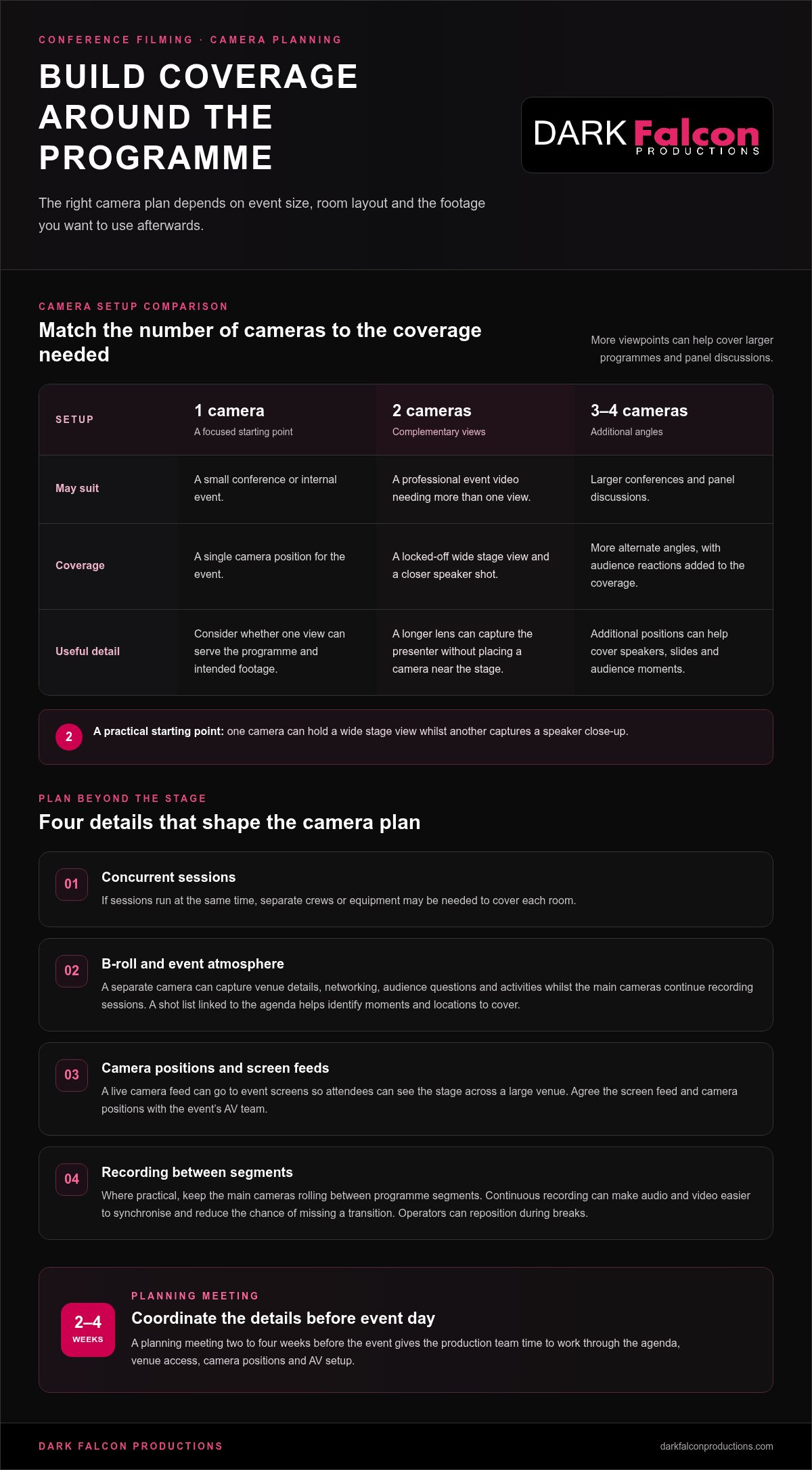
Two cameras are a practical starting point for a polished conference film: one can hold a wide stage view while the other captures a speaker close-up. A single camera may suit a small conference or internal event, but larger programmes often benefit from two or more. Knowing how to choose a conference filming service starts with matching the camera plan to your event and the videos you need afterwards.
It’s natural to focus on cameras, but clear venue audio and thoughtful coverage matter just as much. A strong plan captures presentations without losing the audience, atmosphere or moments that give the event its character.
This guide explains how to assess camera needs, plan for a clean feed from the venue sound desk and understand what shapes a filming quote. It also covers combining presentation slides with footage, so the finished video serves its purpose, whether that means sharing key sessions, communicating internally or extending the event’s reach.
Key Takeaways
- Match the camera setup to the size of the event, the programme and the footage you want to use afterwards.
- Plan for a direct venue sound-desk feed and a backup recording to capture presentations clearly.
- Understand how session timings, crew and camera requirements, and editing needs shape a filming quote.
- Decide how slides should appear alongside the speaker footage before production begins.
How many cameras are needed to film a conference?
A single camera can suit a small conference or internal event. Larger programmes often need two or more cameras to cover speakers, slides and audience reactions without missing key moments.
Camera positions and multi-camera coverage
For a professional event video, a two-camera setup gives editors complementary views: a locked-off wide shot from the back and a closer speaker shot from a fixed position. A longer lens can capture the presenter without placing a camera near the stage. Larger conferences and panel discussions may benefit from three or four cameras, adding audience reactions and alternate angles.
Match the setup to the programme, room layout and intended footage. If sessions run at the same time, separate crews or equipment may be needed to cover each room. A live camera feed can also go to event screens, helping attendees see the stage from across a large venue. Agree on the screen feed and camera positions with the event’s AV team as part of the setup.
B-roll and continuous recording
B-roll adds context beyond the stage. Plan shots of venue details, networking, audience questions and people taking part in activities. A separate camera can capture these moments while the main cameras continue recording sessions. A shot list linked to the agenda helps the crew cover specific moments and locations.
Where practical, keep the main cameras rolling between programme segments. Continuous recording can make it easier to sync audio and video during editing and reduce the chance of missing a transition. Camera operators can reposition during breaks rather than moving through the room mid-session.
For filming in the UK, plan how identifiable footage will be used and shared, and provide clear privacy information before recording. Organisers should consider applicable data-protection requirements when deciding what to capture, who can access it and how long it is retained.
Tell speakers and attendees about filming through event terms, notices and speaker agreements. The organiser typically manages speaker consent, while clear signage helps attendees understand where filming is taking place.
Book early enough to coordinate the agenda, venue access, camera positions and AV setup. A planning meeting two to four weeks before the event gives the production team time to work through these details.
Risks include missed moments, obstructed sightlines, poor coverage of concurrent sessions and footage that cannot be synchronised cleanly. A detailed schedule, agreed camera positions and continuous recording between sessions help reduce these production problems.
Clean audio from the venue sound desk
Clear conference audio starts with the venue sound desk, not the camera’s built-in microphone. Ask the production team to take a direct feed from the PA system as the primary source. This captures the speaker’s microphone clearly while the room microphones and speakers continue serving the audience. Agree on the feed with the venue’s AV team before filming begins.
A direct feed needs a backup. Record a separate audio track in case the desk feed drops out, distorts or misses a microphone change. For networking interviews or presentations without a usable desk feed, discreet radio microphones can capture the speaker more directly. Lavalier or directional microphones help reduce background noise compared with relying on the camera microphone.
Sound is only one part of the setup. Confirm stage access, microphone arrangements and screen positions with the venue team. Check how presenters will move, where they’ll stand and whether a panel discussion uses individual microphones. These details help the crew place equipment without blocking sightlines or interrupting the event.
What equipment and crew are needed to film a conference? The setup depends on the programme and intended coverage, but may include cameras, microphones, a separate audio recorder and a connection to the venue PA. A camera operator for each camera allows every position to be managed, while the sound plan accounts for presentations and interviews.
When planning audiovisual equipment, distinguish venue equipment from the filming setup. While event technology hire specialists such as NextGen AV can supply presentation screens and interactive displays, the filming crew still requires a reliable feed and recording equipment to capture sound. Discuss the event’s purpose, sessions and any live screen feed early, so the audio and staging plans work together.
Before doors open, test a speaker’s microphone and record a short sample from the desk feed and backup recorder. Listen for room noise, dropouts and distortion. This sound check lets the team adjust the setup before it needs to capture the full programme.
What affects conference filming cost?
Conference production costs reflect the crew, filming schedule and finished deliverables. Live mixing and streaming can add technical requirements beyond recording a keynote.
The price depends on the project and is provided after a quote request. Event duration, rooms, camera arrangements, audio, editing, location, access and delivery all shape the cost. Compare packages by matching their inclusions to your programme, rather than comparing a headline figure alone.
Production expertise and live mixing
An experienced production team plans how cameras, sound and presentation visuals work together. For a multi-camera session, a live mix selects camera feeds as the event unfolds, creating a single programme for a large screen or stream. This can reduce post-event editing, but requires a team and setup suited to the schedule.
Compare whether a package covers live switching, screen display and a separate edited recording. For example, a keynote shown live on venue screens may need a different workflow from footage edited after the event.
Streaming, audience interaction and reliability
Professional live streaming adds a remote audience to the production plan. Decide whether viewers need only to watch or also to submit questions and take part in audience interaction. The answer affects how the stream is managed alongside the in-room programme.
Ask the venue about internet access and test the connection at the filming position before the event. Network conditions vary between venues, so plan how to respond if the connection becomes unstable. Keep a local recording of the keynote as a separate deliverable.
Experience and references
To compare conference filming companies and packages, align the deliverables first: live mix, stream, edited sessions and final formats. Then compare crew responsibilities, room coverage, access needs and delivery expectations on the same basis.
To assess experience, review examples of comparable conferences, including panels, keynote presentations and live-screen coverage. References can show how a team handled the schedule, audience needs and unexpected changes. Look for work that demonstrates the moments and recording style your organisation needs, not simply a polished showreel.
Including presentation slides in videos
Decide how presentations should appear before filming, because slide content affects production and editing. A conference video can cut between the speaker and slides or show both together in a split-screen layout. Choose an approach that keeps the presenter visible while making the text readable.
Share the presentation files and running order with the production team before the event. This lets editors align each slide with the matching section of the talk. For example, a speaker close-up can carry the opening, then the edit can show a detailed chart full-screen. Check that slide changes and speaker footage stay in sync, especially during fast-paced presentations.
Choose video formats and durations to suit their intended use. Full session recordings suit on-demand viewing and internal training, while a concise highlights film can recap the event for wider audiences. Speaker interviews or short extracts can support social media. These formats need different coverage and editing choices, so define the purpose before event video production begins. If you're deciding how to choose a conference filming service, make sure the planned formats reflect where viewers will watch.
What services should a conference filming company provide? The production should cover the agreed filming plan, presentation integration and editing into the required videos. Depending on your brief, deliverables may include individual session recordings, a longer recap film or a highlights reel. A practical way to approach how to choose a conference filming service is to specify these outputs before production starts.
Specify each deliverable, format, duration and delivery date in the contract. Simple conference edits may take a few days, while larger projects can take several weeks. A multi-camera edit with colour grading, audio mixing and graphics typically takes five to ten working days; a simple single-camera keynote edit can take two to three days.
Same-day highlights are another possible deliverable, but require planning during production. Set priorities for the edit and identify who approves the final videos. To shape a clear brief around your slides and event footage, plan your conference video with the intended formats and audiences in mind.
Dark Falcon Productions: Creative
Dark Falcon Productions brings event video production and editing together to turn conference coverage into useful content. If you need more than a record of the sessions, the team can shape footage into a considered event video, with shorter edits suited to social media.
Bring your agenda, audience and intended deliverables into the conversation. This gives the production process a clear purpose, whether you need presentation coverage, event photography or short-form content to share afterwards. Social media management can support the wider plan for publishing and using that content.
For organisations planning an event and its video content, Dark Falcon Productions can help take the project from choosing a format to developing the finished creative. Contact Dark Falcon Productions to discuss your conference plans.
Shape your conference footage into a lasting asset
Your event video can continue working after the final session, supporting communication with attendees and those who could not attend. Start by deciding what you want viewers to understand or do. That purpose can guide the creative direction, the moments selected and how each edit serves its audience.
Knowing how to choose a conference filming service means looking beyond the day of recording. Consider how the footage could support future creative projects, short-form content or social media management. Dark Falcon Productions offers Creatives, Shorts and Social media management to help organisations develop content with a clear role beyond the event itself.
Set out your priorities and intended use, then take the next step with a focused conversation. Contact Dark Falcon Productions today to discuss your conference plans and shape footage into purposeful content.
Frequently Asked Questions
Can you livestream the conference as well as recording it?
Yes, a conference can be livestreamed and recorded as part of the same production plan. Treat them as separate outputs: the stream serves remote viewers in real time, while the recording can be edited and shared afterwards. Decide whether the stream needs a branded opening, captions or a way for remote viewers to submit questions. These choices shape the workflow and audience experience.
Should I decide the deliverables before the event?
Yes, decide on the intended deliverables before filming so the production plan reflects how you’ll use the footage. For example, an internal training video may need complete session recordings, while a public-facing recap might focus on selected moments and event atmosphere. Agree on who will review the edits and how feedback will be gathered. This gives the finished content a clear purpose and approval route.
What else should be filmed besides the speakers?
Capture details that help viewers understand the event’s character and context. Useful examples include signage, venue details, registration activity, networking and audience questions. If attendees are taking part in a demonstration or discussion, include those interactions where appropriate. A short interview with an organiser can also give a recap film a clear narrative thread, rather than relying only on presentation footage. If you are also exploring ways to capture individual stories or oral histories alongside broader event coverage, Lumenairi offers specialised tools designed to record and preserve personal narratives.
How much does conference filming cost in the UK?
The cost depends on the project and is provided after a quote request. Key factors include filming duration, room requirements, crew and camera arrangements, audio, presentation needs, editing, location, access and delivery. A single-room keynote with a straightforward edit has a different production scope from a multi-day event with several rooms and complex post-production. Define the required outputs to make the quote relevant.
Does a conference filming service provide live streaming and event recording?
A production plan can include both live streaming and event recording, but they’re distinct deliverables with different uses. For example, remote delegates might watch the stream, while the recording becomes an edited resource for later viewing. Decide whether you need the full session, selected sections or a shorter recap, and whether the stream should include audience questions or presentation slides.
What questions should I ask a conference videographer before booking?
Set out your brief by defining the intended audience, the sessions to capture and the final content you need. Clarify how presentation slides, audience footage and interviews fit the project, then establish who supplies the schedule and venue access details. Also agree on how review and approval will work, which formats you need and whether any sessions run concurrently. These answers help align the production plan with your priorities.