
The Mac isn’t automatically the better choice, and a PC isn’t automatically a budget compromise. For video editing for independent filmmakers, choose a machine that suits your editing software, camera files and working style. Consider whether portability or upgrade flexibility matters more. Make the decision based on your workflow, not the brand.
It’s understandable to focus on the computer first: editing depends on responsive tools and reliable playback. But the operating system is only part of the picture. Your footage, project demands and preferred way of shaping a story matter too.
This guide compares Mac and PC, helps you match editing software to your workflow, and outlines practical performance considerations. It also looks at how editing choices can bring performances into focus and shape documentary narratives, from a complete film to a concise trailer. The aim is to find a setup that supports the story you want to tell, not one chosen for its logo.
Key Takeaways
- Choose a Mac or PC by weighing your editing software, footage and preferred working style, rather than relying on brand assumptions.
- Match your software and setup to the project’s demands, then refine performance through precise timing and considered cuts.
- Shape a documentary around its strongest material, building a clear narrative that can work across different formats.
- Use case studies to see how editing choices change a project, and consider Dark Falcon Productions’ creative work when you need support developing a short or related content.
1. Editing performances across film and digital formats
Editing a performance starts with intention: preserve the actor’s emotional continuity while shaping the pace. Review each take for eye line, gesture, breath and the moment a reaction changes. Spike Lee teaches that timing can shift through adjustments as small as a twelfth of a second. That precision can make a pause feel charged or let a response land naturally. Let the director’s choices, script and recorded material guide each cut.
For festival and streaming delivery, use the destination’s current technical specification rather than assuming one export suits every screen. Confirm the required frame size, frame rate, aspect ratio, codec, audio layout and file container before exporting. Keep a high-quality master, then create each requested version from it. If a festival specifies a particular codec or file format, follow that specification. No single export setting suits every platform.
Music, footage and recorded performances need appropriate permissions for their intended use. Secure written agreements that define permitted media, territory and duration, and obtain releases from identifiable contributors where needed. Clear music rights for both the composition and recording: owning or commissioning one does not automatically clear the other. Keep signed documents with the edit, and check that poster artwork uses properly cleared images and names.
Funding can support development before production, so prepare a clear script, budget and project statement for each application. Film Independent’s Climate Entertainment Initiative offers a development grant for eligible filmmakers with climate-focused fiction features. Its commissioning grant supports a Project Involve screenwriter developing a new climate-focused fiction feature script. Eligibility is specific, so match the project’s stage and focus to each programme. A trailer, often one to two minutes, can communicate tone and story; a poster should express the same creative direction at a glance.
Music and sound design do more than create atmosphere: a restrained score can preserve documentary intimacy, while carefully placed room tone helps edits feel continuous. When hiring a freelance editor, shortlist people whose work fits your format and storytelling needs. Share a brief, sample footage, delivery requirements and review process, then agree responsibilities and feedback stages before editing begins. This gives the editor and filmmaker a shared framework for refining the cut, from performance choices to final exports.
2. Choosing editing software for project and workflow needs
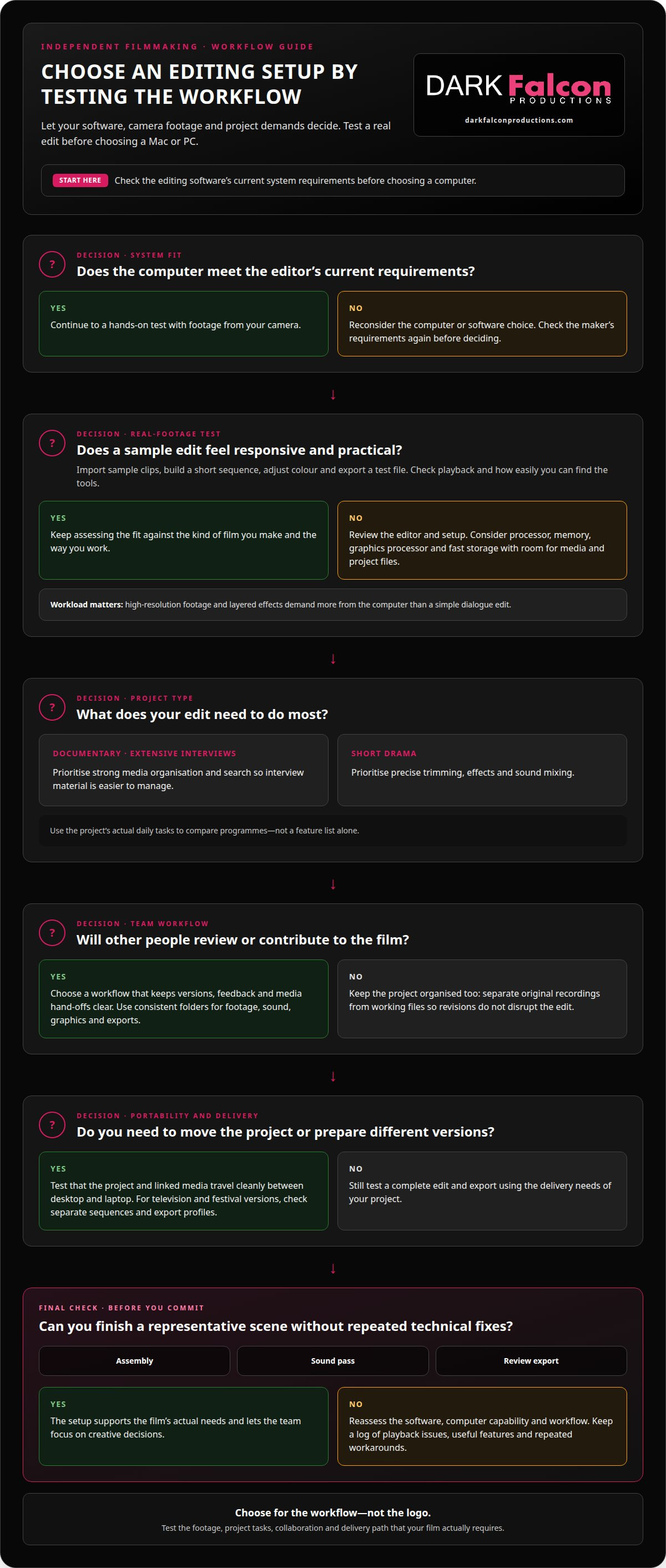
Choose software by testing it with your footage, preferred workflow and delivery needs. For the computer, prioritise a capable processor, ample memory, a graphics processor suited to your editor, and fast storage with room for media and project files. High-resolution footage and layered effects demand more from these components than a simple dialogue edit. Check the software maker’s current system requirements before choosing a Mac or PC.
Next, assess how each programme handles the project’s daily tasks. Import sample clips from your camera, create a short sequence, adjust colour and export a test file. Notice whether playback stays responsive and whether the interface makes tools easy to find. A documentary with extensive interviews may need strong media organisation and search, while a short drama may rely more on precise trimming, effects and sound mixing. This practical test grounds video editing for independent filmmakers in the demands of a real project.
Consider the other people contributing to the film. An artist may need to review cuts, a writer may track script changes, and a composer may deliver separate music stems. Choose a workflow that keeps versions, feedback and media hand-offs clear. For example, use consistent folder names for footage, sound, graphics and exports. Keep original recordings separate from working files so revisions don’t disrupt the edit.
Test collaboration and portability before production advances. If the director moves between a desktop and laptop, check that the project and its linked media travel cleanly. If you plan a television version alongside a festival cut, confirm that the editor can maintain separate sequences and export profiles. Keep a log of software tests, noting playback issues, useful features and repeated workarounds. For video editing for independent filmmakers, these observations make comparisons more relevant than a feature list alone.
Finally, balance capability with the learning curve. A feature-rich editor brings little benefit if routine tasks slow the creative process. Pick a representative scene, then complete an assembly, a sound pass and a review export. The strongest fit supports the film’s actual needs and lets the team focus on creative decisions rather than repeated technical fixes.
3. Documentary narrative structure and editing
Documentary footage rarely arrives as a finished story. Begin by writing its central question, then sort interviews, observational scenes and archive pictures against it. David Mamet advises editors to consider removing the first 10 minutes and starting later. Apply that test to the opening: does it establish the subject’s stakes, or delay the first meaningful change?
Build a paper edit before shaping the timeline. Group interview excerpts by idea, not recording order, and label each clip with its key claim or emotional turn. For example, a film about a community project might move from a local challenge to residents’ responses, then show what changed. This structure gives the audience a clear thread without forcing every detail into the cut.
Use motion and visual contrast to guide attention. A still interview can gain energy when intercut with relevant activity, such as hands repairing a tool or a street changing through the day. Check that each picture adds context, evidence or emotional meaning. If it merely repeats the narration, remove it or find a more revealing image.
Shape transitions around cause and consequence. Place a response after the event that prompted it, and let a pause remain when it carries meaning. During collaboration, ask the director and contributors specific questions: is the timeline clear, does a scene misrepresent someone, and does the ending answer the opening question? Record decisions so later revisions stay focused.
Prepare the digital cut for its viewing context. A cinema screening may benefit from measured pacing and room for silence, while a short online version needs a strong opening image and a clear route through the argument. Keep titles readable, identify speakers where context requires it, and check names against production records. Finally, watch the full sequence without stopping. Note where attention shifts, then make targeted changes instead of polishing every shot equally.
4. Editing case studies
Use case studies to examine decisions, not just polished reels. Imagine a studio editing a dialogue-led short: the vision depends on restrained performances, but the rushes contain overlapping lines and uneven pauses. The editor groups takes by emotional beat, then compares reactions before choosing each cut. This workflow shows how editing can clarify character without adding scenes or changing the story’s intent.
Now imagine an independent feature built around a journey across several locations. The production has striking pictures, yet the first assembly feels episodic. The editor maps each scene against the protagonist’s changing goal, then moves a pivotal encounter earlier. A rough screening reveals whether the shift creates momentum or confusion. Reviewing the sequence with the director can also help distinguish a structural problem from a deliberate, slower rhythm.
A documentary case study presents a different challenge: interviews offer competing accounts of a local issue. The editor arranges the claims alongside observational footage, letting viewers compare words with visible evidence. Separate dialogue, ambience and music tracks make it easier to adjust emphasis without masking speech. A practical review asks whether each cut preserves context, represents contributors fairly and advances the film’s central question.
For a digital release, a feature may also need a concise trailer. Select a scene that establishes the central tension, then build towards a moment that invites attention without resolving the ending. Compare the trailer’s tone with the full film and its poster artwork. Keep versions organised by date and purpose, so feedback on a festival edit doesn’t become confused with social clips. These examples show how editing choices connect creative vision with delivery. If you’re shaping a film and need focused post-production support, explore professional video editing.
Dark Falcon Productions: Creative
Dark Falcon Productions can be a natural next step when your film needs a clear creative direction or a shorter format for wider use. Its Creatives service supports the development of ideas, while Shorts can help shape a concise piece from a larger project. These options suit filmmakers planning companion content alongside a feature or documentary, with each piece serving a distinct audience and purpose.
Consider the project’s central message before deciding what to develop. A focused short may introduce its themes, while creative work can establish a consistent direction across related content. Dark Falcon Productions also offers social media management and Events, which may suit a project that extends into audience engagement or a live event.
To discuss your project and explore a suitable creative direction, contact Dark Falcon Productions.
Carry your film into its next stage
Turn your editing decisions into a working plan. Define what the audience should feel, identify the material that supports that intention, and set a clear review process with your collaborators. This gives each creative choice a purpose, from the first assembly through the final version.
For video editing for independent filmmakers, the right tools matter because they serve the story, not because they define it. Keep your project’s central idea visible as you make decisions about pace, structure and delivery. A focused brief helps collaborators understand the film’s direction and contribute with clarity.
If you’re ready to develop your project’s next creative step, contact Dark Falcon Productions. Your story can move forward with purpose and a clear sense of direction.
Frequently Asked Questions
Mac or PC?
Either can work. Choose the computer that runs your preferred editor and fits your working habits. A Mac may suit you if you already use Apple devices, while a PC gives you a wider choice of hardware configurations. Compare two machines using the same sample project, then assess playback, export workflow and comfort. Your footage and editing tasks matter more than the logo.
What video editing software is best for independent filmmakers?
The best editor supports your project’s essential tasks without slowing you down. DaVinci Resolve, Adobe Premiere Pro and Final Cut Pro are established options to compare, though their features and licensing differ. Test a real scene: organise media, refine dialogue, adjust colour and export a review file. This practical trial reveals whether the interface and workflow suit your film.
How much does video editing software cost in the UK?
UK software costs depend on the licence model, edition and included features. Some editors use subscriptions, while others offer a one-off licence or a free version with limitations. Compare the total cost over the period you expect to use the software, including any paid upgrades or add-ons you need. Check the software maker’s current UK price and licence terms before choosing.
What are the best free video editing tools for filmmakers?
DaVinci Resolve, Kdenlive and Shotcut are free tools worth testing for independent projects. Their workflows differ, so choose based on the work you need to complete, not the number of advertised features. Try a short scene with dialogue, music and titles, then export it and watch it on another device. This test helps reveal usability, playback and delivery limits before you commit to your edit.
What video formats, codecs and export settings suit film festivals and streaming platforms?
Use each festival or platform’s current technical specification. Confirm the required frame size, frame rate, aspect ratio, codec, audio layout and file container. Keep a high-quality master and create each requested version from it.
How do you organise footage, create proxies and back up a film project?
Use consistent folders for footage, sound, graphics and exports, and keep original recordings separate from working files. The project workflow described does not provide steps for creating proxies or backups.